Play Android Games on Mac.
120 FPS. Zero Emulator Lag.
Traditional Android emulators on Mac run heavy virtual machines that max out your CPU, spin up fans, eat 30GB+ of SSD space, and trigger anti-cheat account bans. Tandem Mirror streams games directly from your phone’s Snapdragon or Tensor GPU onto your Mac display at 120 FPS—complete with a visual WASD Keymapper (⌘G) and native Xbox/PS5 controller support.
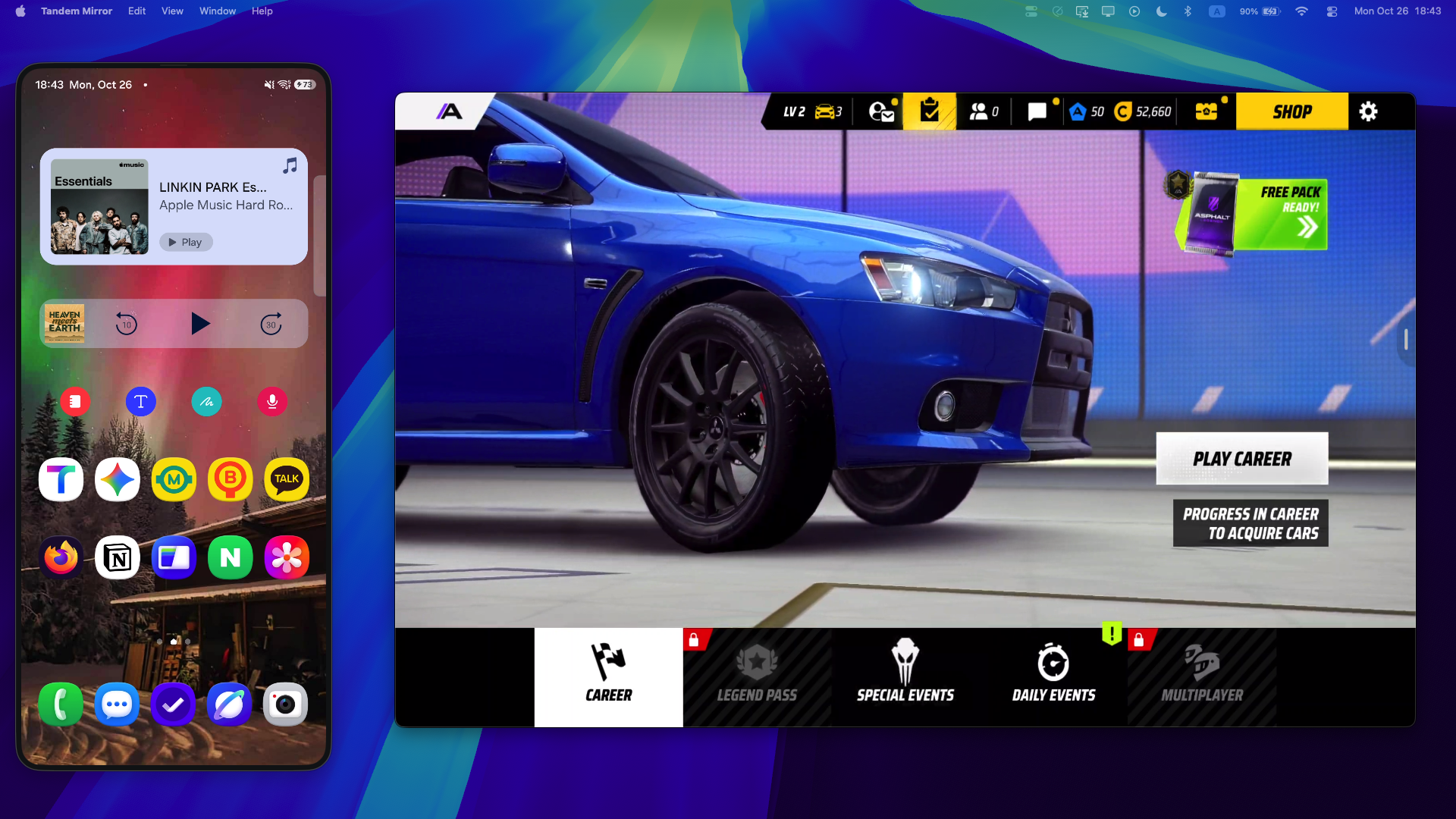
Asphalt Legends Unite running at 120 FPS on macOS with Tandem Mirror’s multi-touch Game Keymapper (⌘G).
Why Virtual Machine Emulators Fail on Apple Silicon Macs
Emulating Android on macOS requires translating graphics calls inside a virtual machine, causing thermal throttling and micro-stutters. Worse, competitive games (Call of Duty Mobile, PUBG, Brawl Stars, Genshin) actively detect emulator signatures and ban player accounts.
Hardware-Accelerated Streaming + Visual Keymapper (⌘G) + Gamepad Bridge
Built from the ground up in Swift 6 and Metal for macOS Sonoma and macOS Sequoia. 100% local peer-to-peer connection with zero cloud accounts and a one-time $19 lifetime license (slashed from $24 — includes 2 Macs).
Key Capabilities
✓ Visual Multi-Touch Keymapper HUD (⌘G)
Press ⌘G to drag custom key pins (WASD, Space, Shift, Mouse) over any on-screen mobile button. Each key uses a dedicated hardware pointer ID so you can steer, drift, and fire nitro simultaneously with zero ghosting.
✓ Native Bluetooth Xbox & PS5 DualSense Controller Support
Pair any Xbox, PlayStation DualSense, or Switch Pro controller to your Mac via Bluetooth—Tandem automatically routes analog thumbsticks, triggers, and face buttons into your game profile.
✓ 100% Ban-Free & Zero Re-Downloading
Because the game runs on your real, certified Android phone hardware, anti-cheat systems see zero emulator flags, and all your accounts and 20GB+ game files are ready instantly.
✓ Under 3% Mac CPU Usage & Silent Fans
Your phone’s GPU handles the 3D rendering while your Mac decodes the 120 FPS stream in hardware via Metal.
How to Get Started in 30 Seconds
- 1 Open Tandem Mirror on your Mac and launch any mobile game on your Android phone.
- 2 Press ⌘⌥R to rotate the Mac window into fullscreen Landscape (without rotating your physical phone screen).
- 3 Press ⌘G to customize your keyboard pins or connect a Bluetooth Xbox/PS5 controller and play at 120 FPS.
Frequently Asked Questions
Can I get banned by anti-cheat for using Tandem Mirror?
No. Unlike virtual machine emulators, the game is running natively on your genuine Android phone hardware, and inputs are delivered as standard multi-touch coordinates.
Can I hold multiple keys at the same time (e.g., Steer + Drift + Nitro)?
Yes! Every binding in the ⌘G Keymapper is assigned an independent multi-touch pointer ID so up to 10 simultaneous key presses work with zero ghosting.
Does it support Bluetooth controllers connected to my Mac?
Yes. Tandem integrates Apple’s native GameController framework (GCController) to automatically bridge Xbox, PlayStation DualSense, and Switch Pro controllers.
Try Tandem Mirror Free for 14 Days
Every feature is 100% unlocked with zero credit card required. Own it forever on 2 Macs for a one-time payment of $24 $19 (Save 21%).